

2xx status within 10 seconds. Otherwise Cimento tries it again.
Retries
Cimento makes up to 8 attempts over about 32 hours. After a failed attempt it waits, then tries again:
A retry can start up to a minute after it is due. If the eighth attempt fails, the delivery is marked Failed and Cimento stops trying. You can send it again yourself.
Every attempt sends the same event with the same
webhook-id. The webhook-timestamp and the signature are new each time.
When an endpoint keeps failing
Retries apply to one delivery. Cimento also watches each endpoint as a whole, so that an endpoint that is down isn’t sent every event eight times.- Paused after 5 failures in a row. Cimento stops sending to the endpoint for 1 minute. Each further failure doubles the pause, up to 60 minutes. Deliveries wait during a pause, and the wait doesn’t use up one of their 8 attempts.
- Back to normal on the first success. Any
2xxanswer clears the pause and the failure count. - Disabled after 5 days. If an endpoint has failed continuously for 5 days, with at least 20 failures in a row, Cimento disables it and cancels the deliveries still waiting for it.
After you fix it
1
Enable the endpoint
If the endpoint was disabled, open its ⋯ menu and choose Enable. Its failure count starts again from zero.
2
Send a test event
Choose Send test event and check it succeeds in the delivery log.
3
Send what was missed
Open the endpoint’s deliveries and use Retry failed deliveries for the days it was down. See Send deliveries again.
The delivery log
Each endpoint has a log of what Cimento sent it. Open it by clicking the endpoint’s URL on the Webhooks page, or View deliveries in its ⋯ menu.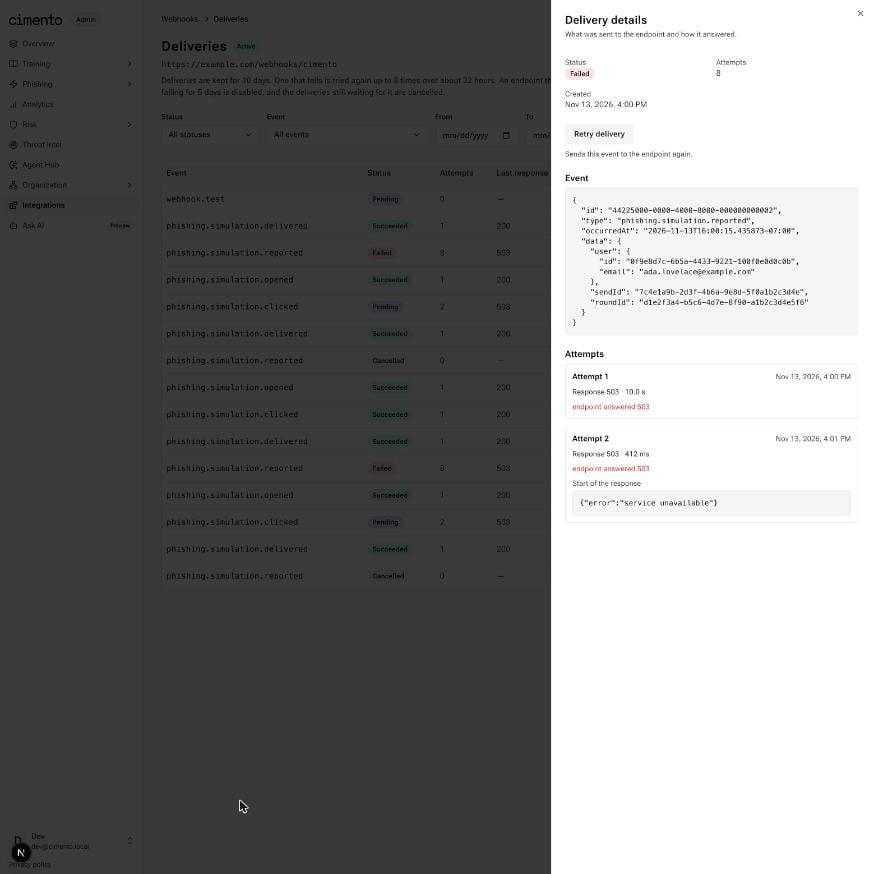
An endpoint's deliveries, with one delivery's details open
Filter the log by Status, Event and a From and To date. Dates are whole days in your browser’s time zone. Load more shows older deliveries.
Click a delivery’s event, or View details in its menu, to see:
- the Event: its
id,type,occurredAtanddata; - each Attempt: when it was made, the response code, how long your endpoint took, the error if there was one, and the start of your endpoint’s response.
Send deliveries again
You can retry a delivery that is Failed or Cancelled, as long as the endpoint is active. A retried delivery goes back to Pending, starts a fresh set of 8 attempts, and is sent within about a minute.- One delivery. Open the delivery’s details and click Retry delivery, or choose Retry in its row’s menu.
- A range of days. Click Retry failed deliveries, choose the First day and Last day, and click Retry deliveries. Cimento sends every Failed and Cancelled delivery created in that range again and tells you how many it queued. A range covers up to 30 days. Deliveries that succeeded are left alone.
webhook-id, so a receiver that recognizes duplicates handles a retry of something it already has without trouble.
The log doesn’t refresh by itself. Reload the page to see how a retry went.